
文章内容
- 1.1 框架
- 2.1 UML 类图
- 2.2 元类
- 2.3 数据总线:类名即 key
- 2.4 Response 封装:成功与否 + 数据
- 2.5 插件发现:目录 → 包名 → import → 校验
- 2.5.1 目录名到包名:支持两级分组
- 2.5.2 plugin.yaml 配置
- 2.5.3 importmodule 触发注册
- 2.5.4 注册表校验
- 2.6 执行:实例化 → invoke → 写总线
- 3.1 执行命令
- 3.2 总时序图
- 3.3 入口:配置注入先于发现
- 3.4 引擎装配:工厂声明执行顺序
- 3.5 插件怎么写
- 3.6 示例插件一:http-request 的 invoke
- 3.7 示例插件二:html2markdown
一、插件框架要回答的三个问题
一个插件框架绕不开三点:
- 引擎怎么知道有哪些插件
- 引擎怎么用统一方式驱动它们
- 插件之间怎么传数据
pyplugin-framework 给出的方案是:
- 第一个问题交给元类:插件类定义完成的瞬间,元类会把这个类写进一张全局注册表,引擎侧不需要维护任何登记代码。
- 第二个问题交给
PluginCore:所有插件都从它派生,引擎统一调用它们的invoke方法。 - 第三个问题交给
PluginContext:它是一条进程内的数据总线,上游插件把产物写进去,下游插件再按 key 取出来。
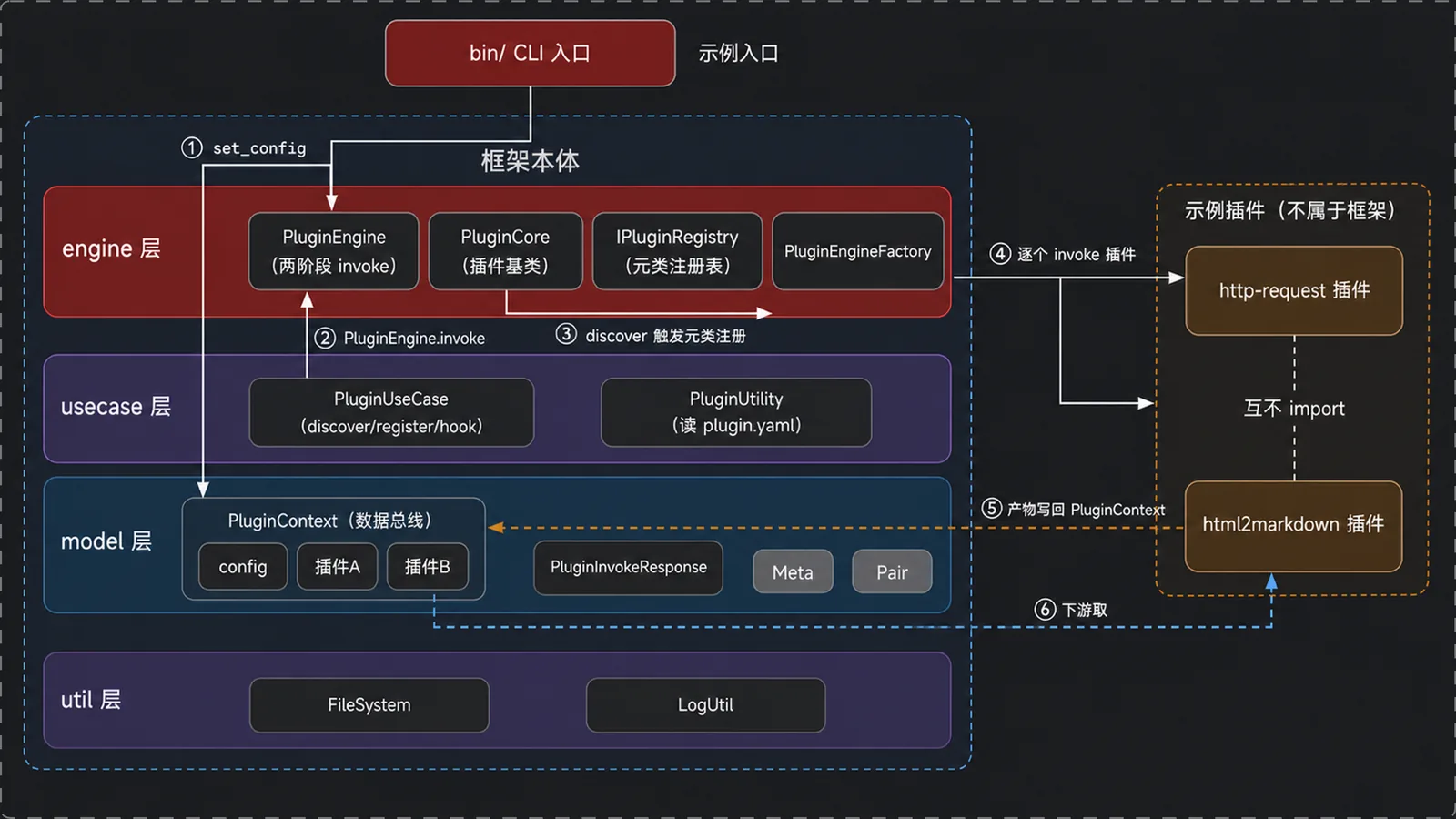
1.1 框架
框架代码集中在四个包里:
engine/ 协议与驱动:PluginCore、IPluginRegistry、PluginEngine、PluginEngineFactoryusecase/ 发现与装配:PluginUseCase(discover/register/hook)、PluginUtility( plugin.yaml)model/ 数据协议:PluginContext(总线)、PluginInvokeResponse、Meta、Pair、PluginConfigutil/ 通用工具:FileSystem(文件与下载)、LogUtil(日志)二、框架:协议、数据与驱动
2.1 UML 类图
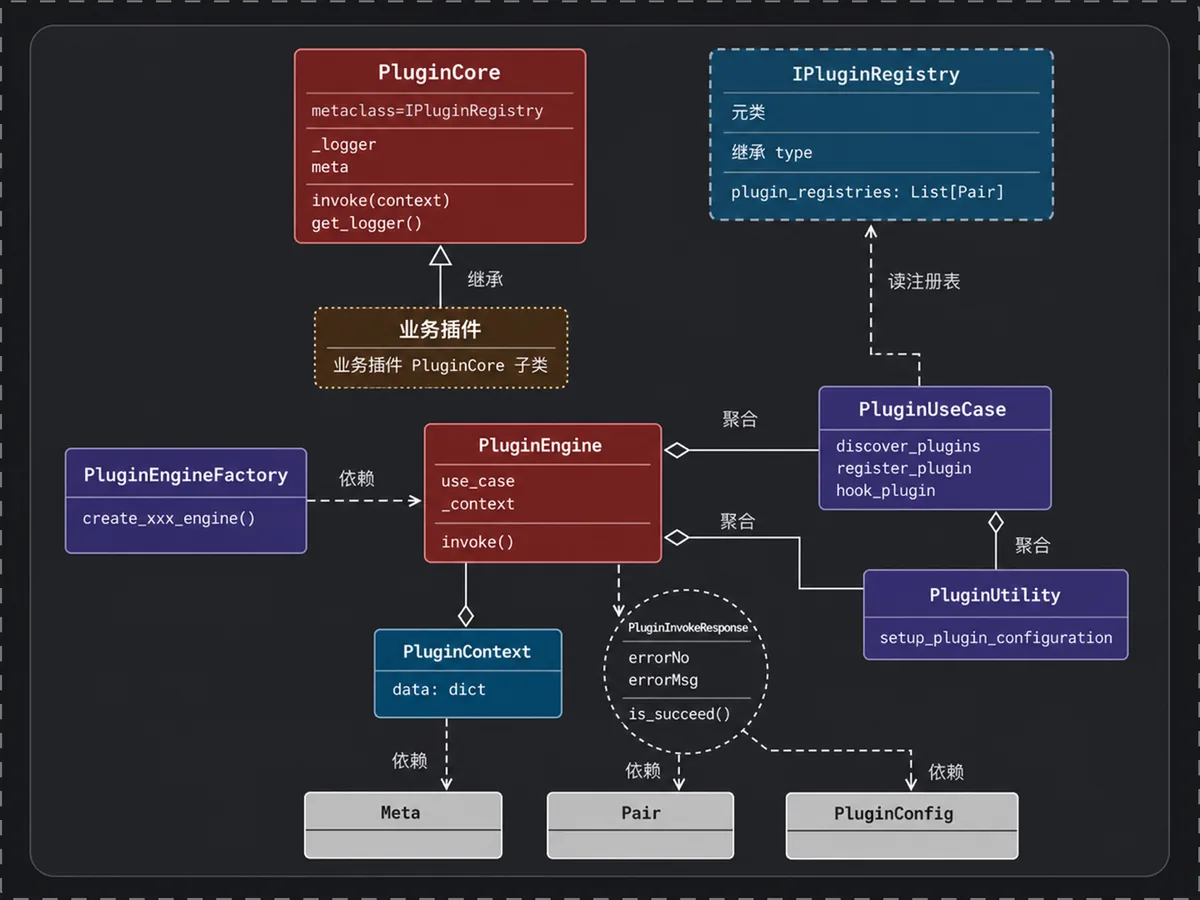
图里有两条关系。一条是继承:插件都从 PluginCore 派生,框架里没有别的插件基类。另一条是元类:IPluginRegistry 被声明为 PluginCore 的元类,因此每当一个子类定义完成,它就把这个子类收进全局注册表。
PluginEngine 持有 PluginUseCase 和 PluginContext,前者装配插件,后者在插件之间传数据。PluginUseCase 从注册表取出插件类并加载模块,它需要的入口信息由 PluginUtility 从 plugin.yaml 里解析。
2.2 元类
元类可以理解成「造类的类」。一条 class 语句执行完之后,Python 先调用元类创建出这个类对象,紧接着再调用元类的 __init__。注册动作就挂在这个 __init__ 里。
engine/engine_contract.py:
# 元类继承 type,成为「造类的类」class IPluginRegistry(type): # 全局注册表,挂在元类上,所有子类共享 plugin_registries: List[Pair] = list() # 每定义一个以本类为元类的类,__init__ 就被调用一次 def __init__(cls, name, bases, attrs): # 先走 type 的默认类创建流程 super().__init__(cls) # 基类 PluginCore 自己不注册,否则每次初始化都多一条脏数据 if name != 'PluginCore': # 把「类对象 + 名字」作为一条记录塞进注册表 IPluginRegistry.plugin_registries.append(Pair(type=cls, meta=Meta(name)))# PluginCore 声明自己的元类,它的所有子类都会继承这个元类class PluginCore(object, metaclass=IPluginRegistry): meta: Meta def __init__(self, logger: Logger, meta: Meta) -> None: # 插件保存框架传入的 logger 和元信息 self._logger = logger self.meta = meta # 插件唯一需要覆写的方法:入口 def invoke(self, context: PluginContext) -> PluginInvokeResponse: self._logger.debug(f'invoke in 【{self.meta.name}】') pass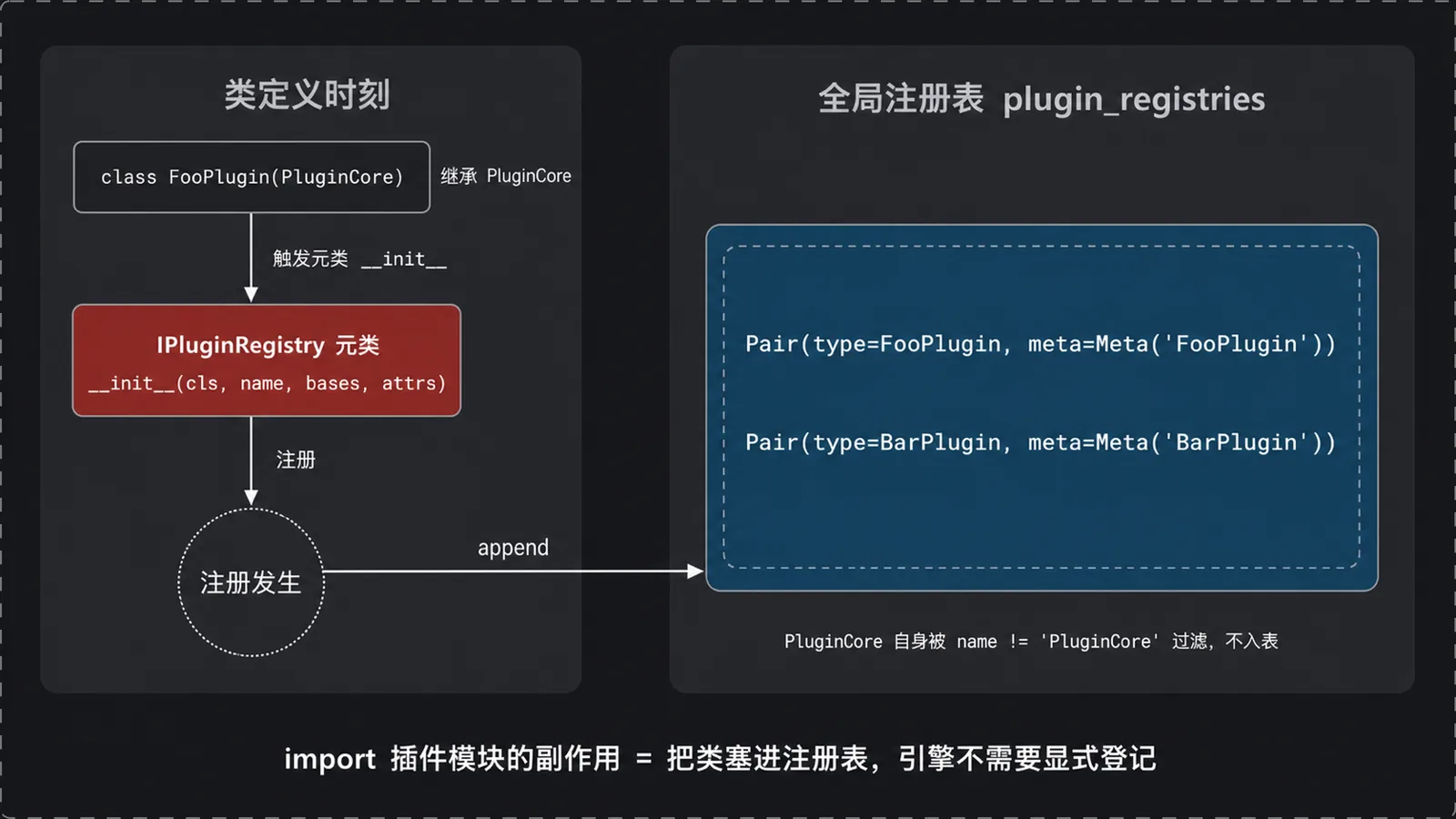
metaclass=IPluginRegistry 这一行声明会被子类一并继承下去,所以任何继承 PluginCore 的类,在自己定义完成时就会把自己 append 进 plugin_registries。
于是「导入插件模块」就等价于「注册插件」,引擎侧不用写一行登记代码。if name != 'PluginCore' 是为了把基类排除在外:PluginCore 自己也由这个元类创建,不拦一下,每次导入框架都会往表里多一条无效记录。
2.3 数据总线:类名即 key
插件 A 的产物怎么交给插件 B?答案是 PluginContext(model/models.py)。插件之间不直接通信,各自只和 PluginContext 打交道:
class PluginContext: # 总线:一个 dict,config 和所有插件产物都塞在这里 data = {} def set_config(self, common_data): # 入口配置(url、out_dir 等)先写进总线 self.data['config'] = common_data def get_config(self): return self.data['config'] def get_plugin_data(self, plugin_name): # 按插件名取上游产物,取不到返回 None if not self.data.get(plugin_name): return None return self.data[plugin_name] def set_plugin_data(self, plugin_name, data) -> None: # 插件执行完,把结果按插件名写回总线 self.data[plugin_name] = data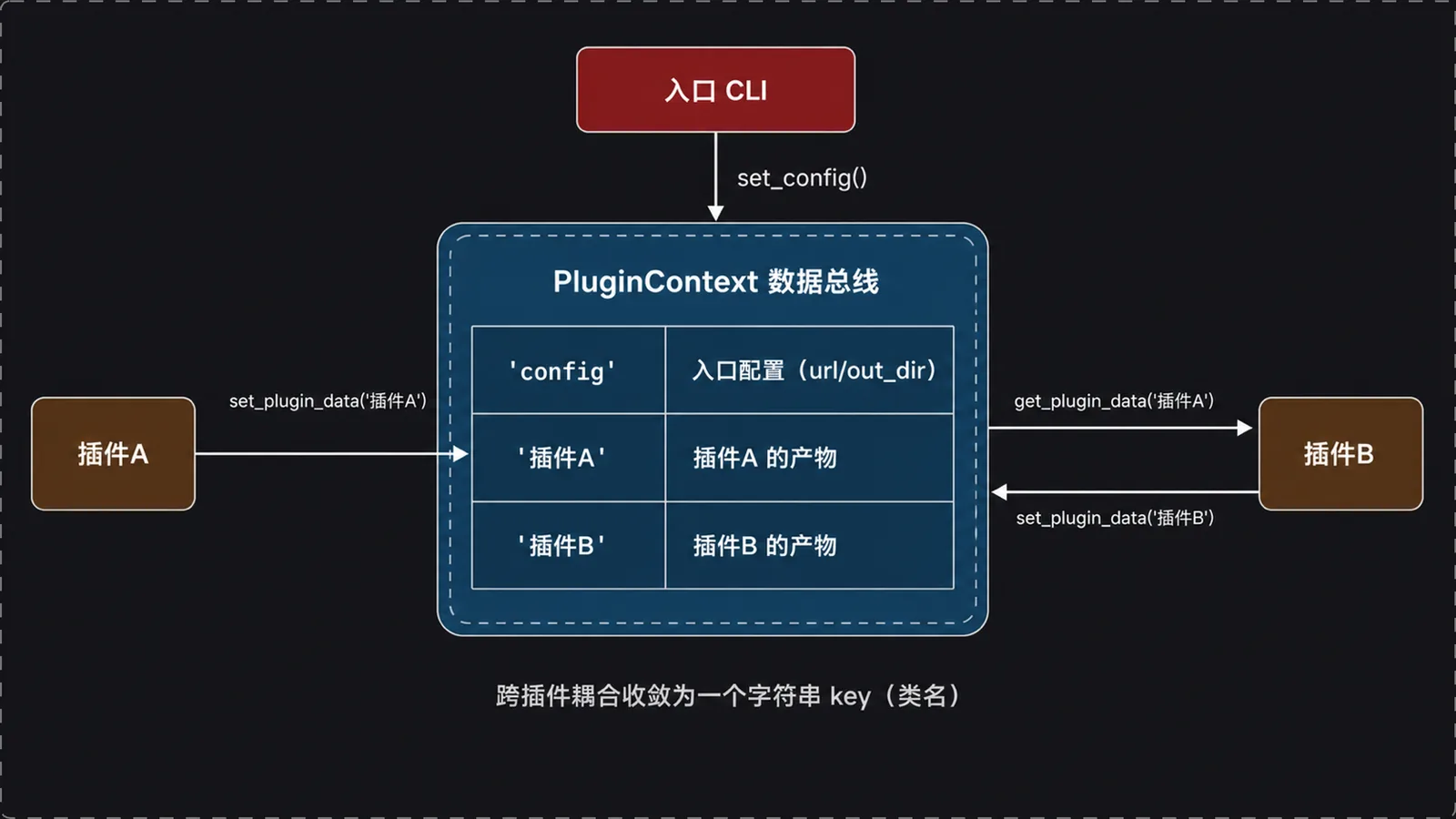
总线是插件之间唯一的数据通道。上游插件执行完,引擎把它返回的 res.data 以 plugin_name 为 key 写进 data,下游插件再用同一个 key 取。两个插件谁都不持有对方的引用,共享的是String Data。
2.4 Response 封装:成功与否 + 数据
PluginInvokeResponse 是插件唯一的返回值类型(model/models.py):
@dataclassclass PluginInvokeResponse: # 成功码固定为 0 PLUGIN_INVOKE_OK = 0 data = {} # 错误码,0 表示成功 errorNo: int # 错误信息,成功时为空串 errorMsg: str = '' @staticmethod def create_succeed_response(data): # 构造成功响应,码为 0,数据单独赋值 res = PluginInvokeResponse(PluginInvokeResponse.PLUGIN_INVOKE_OK) res.data = data return res @staticmethod def create_failed_response(error_no: int, error_msg: str): return PluginInvokeResponse(error_no, error_msg) def is_succeed(self) -> bool: return self.errorNo == self.PLUGIN_INVOKE_OK引擎不关心插件的业务数据长什么样,只调用 is_succeed() 问一句成没成。成功就把 res.data 写进总线,失败就记一条错误日志,不写总线。
2.5 插件发现:目录 → 包名 → import → 校验
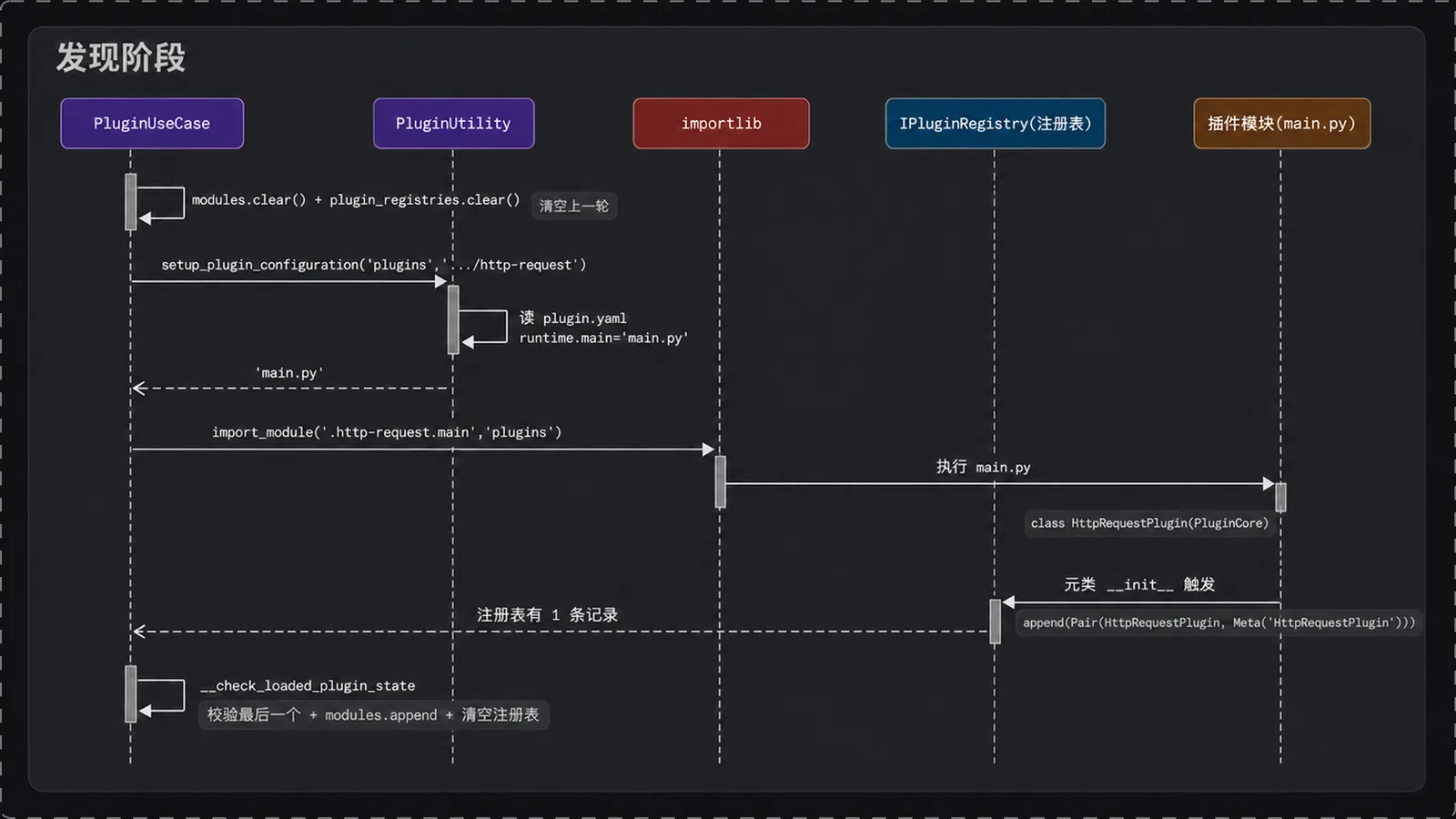
PluginEngine.invoke() 内部分两个阶段。第一阶段 __install_plugins 发现插件,第二阶段 __invoke_on_plugins 依次执行。发现最终落到 PluginUseCase.discover_plugins(usecase/interactors.py):
def discover_plugins(self, plugins: List[str]): # 清空上一轮的模块列表 self.modules.clear() # 清空上一轮的注册表 IPluginRegistry.plugin_registries.clear() # 逐个目录扫描 self.__search_for_plugins_in(plugins)2.5.1 目录名到包名:支持两级分组
def __search_for_plugins_in(self, plugins_path: List[str]): for directory in plugins_path: # 插件包的根,固定是 'plugins' base_plugin_package = self.plugin_util.get_root_plugin_package() # 插件目录的绝对路径 plugin_directory = self.plugin_util.get_root_plugin_dir() # 去掉首尾斜杠 directory = directory.strip('/') # 找最后一个斜杠,判断是否带「分组/插件名」两级结构 index = directory.rfind('/') if index < 0: # 无斜杠:直接挂在 plugins 下 last_package = directory package_name = base_plugin_package else: # 有斜杠:分组名转成包名 last_package = directory[index + 1:] package_name = base_plugin_package + '.' + directory[:index].replace('/', '.') # 读 plugin.yaml,拿到入口文件名,没配置就跳过 entry_point = self.plugin_util.setup_plugin_configuration(package_name, plugin_directory + '/' + directory) if entry_point is not None: # 入口文件名去掉扩展名 plugin_name, plugin_ext = os.path.splitext(entry_point) # 用字符串拼出相对导入目标 import_target_module = f'.{last_package}.{plugin_name}' # 字符串导入,触发元类注册 module = import_module(import_target_module, package_name) # 校验这次 import 确实注册了插件 self.__check_loaded_plugin_state(module) else: self._logger.warning(f'No valid plugin found in {package_name}')2.5.2 plugin.yaml 配置
setup_plugin_configuration(usecase/utilities.py)判断目录存在后读取 plugin.yaml:
def setup_plugin_configuration(self, package_name, module_name) -> Optional[str]: # 拼出插件目录的绝对路径 module_path = os.path.join( FileSystem.get_plugins_directory() + "/" + FileSystem.get_plugin_path_by_package_name(package_name), module_name) # 不是目录就不扫(跳过 __pycache__ 之类的文件) if os.path.isdir(module_path): plugin_config: Optional[PluginConfig] = self.__read_configuration(module_path) if plugin_config is not None: # 返回入口文件名,例如 main.py return plugin_config.runtime.main return Nonedef __read_configuration(self, module_path) -> Optional[PluginConfig]: try: # 读插件目录下的 plugin.yaml plugin_config_data = FileSystem.load_configuration('plugin.yaml', module_path) # dacite 把 dict 反序列化成 PluginConfig 数据类 plugin_config = from_dict(data_class=PluginConfig, data=plugin_config_data) return plugin_config except FileNotFoundError as e: self._logger.error('Unable to read configuration file', e) except (NameError, ForwardReferenceError, UnexpectedDataError, WrongTypeError, MissingValueError) as e: self._logger.error('Unable to parse plugin configuration to data class', e) return Noneplugin.yaml 只声明入口文件名:
runtime: main: 'main.py'runtime.main 填的是入口文件名。dacite.from_dict 把 YAML 解析出的 dict 映射成 PluginConfig,其中 runtime 对应 PluginRunTimeOption,main 挂在它上面。
一个目录算不算插件,就看两点:有没有 plugin.yaml,runtime.main 指的文件在不在。两条都满足才会被 import,否则日志里只留一条 No valid plugin found。
2.5.3 import_module 触发注册
import_module('.http-request.main', 'plugins') 执行时,Python 会跑一遍 main.py。跑到 class XXXPlugin(PluginCore) 时元类的 __init__ 被触发,这个类被塞进 plugin_registries。import 返回时,注册表里就是刚定义的那个类。
2.5.4 注册表校验
def __check_loaded_plugin_state(self, plugin_module: Any): if len(IPluginRegistry.plugin_registries) > 0: # 取注册表最后一个,刚 import 的模块注册的类排在最后 latest_module = IPluginRegistry.plugin_registries[-1] latest_module_name = latest_module.type.__module__ current_module_name = plugin_module.__name__ if current_module_name == latest_module_name: # 对上了,收进正式模块列表 self.modules.append(latest_module) else: self._logger.error( f'Expected to import -> `{current_module_name}` but got -> `{latest_module_name}`') # 校验完清空注册表,避免污染下一个模块 IPluginRegistry.plugin_registries.clear() else: self._logger.error(f'No plugin found in registry for module: {plugin_module}')校验取注册表里最后一个 Pair,拿它的 type.__module__ 和刚 import 的模块名比对。一致就说明这次 import 确实注册了插件,把这条记录收进 modules;不一致就记一条错误日志。两种情况最后都会清空注册表,下一个模块的注册才不会被上一次的残留干扰。
2.6 执行:实例化 → invoke → 写总线
发现完成后,__invoke_on_plugins 遍历 modules(engine/engine_core.py):
def __invoke_on_plugins(self): for module in self.use_case.modules: # 实例化插件:module.type 就是那个被注册的类 plugin = self.use_case.register_plugin(module.type, self._logger, module.meta) # hook 出 invoke 方法并立即调用,传入总线 res = self.use_case.hook_plugin(plugin)(self._context) if res.is_succeed(): # 成功:把产物按类名写回总线 self._context.set_plugin_data(module.meta.name, res.data) self._logger.info(f'{module.meta.name} invoke succeed') else: # 失败:记日志,不写总线 self._logger.error(f'{module.meta.name} invoke failed, error in {res.errorMsg}')被调用的 register_plugin 和 hook_plugin 都是薄封装(usecase/interactors.py):
@staticmethoddef register_plugin(module: type, logger: Logger, meta: Meta) -> PluginCore: # 实例化:调用 PluginCore.__init__(logger, meta) return module(logger, meta) @staticmethoddef hook_plugin(plugin: PluginCore): # 返回插件对象的 invoke 方法 return plugin.invoke执行阶段唯一写状态的调用是 self._context.set_plugin_data(module.meta.name, res.data),插件对外的输出就是这一笔。key 取自 module.meta.name,它来自元类注册时构造的 Meta(name),也就是插件类名。
三、实战
pyplugin-framework 自带两个示例插件:http-request 把网页抓成离线副本,html2markdown 再把本地 html 转成 markdown。两个插件接成一条管道,代码里却没有一行互相 import。
3.1 执行命令
python bin/html2markdown/html2markdown-cli.py --no-assets执行日志(render=false 静态抓取):
Successfully imported module `plugins.http-request.main`Successfully imported module `plugins.html2markdown.main`invoke in 【HttpRequestPlugin】html downloaded: 8801 chars -> .../raw.html (render=False)HttpRequestPlugin invoke succeedinvoke in 【Html2MarkdownPlugin】read html: .../index.html (8904 chars)article content matched by: auto:densest-blockmarkdown saved: .../前缀和与差分模板图解.md (451 chars, 0 code blocks, 1 images)Html2MarkdownPlugin invoke succeed日志分两截。开头两条 Successfully imported 来自发现阶段,两个插件模块都 import 成功。后面交替出现的 invoke in 和 invoke succeed 来自执行阶段,一对日志对应一个插件跑完一轮。
3.2 总时序图
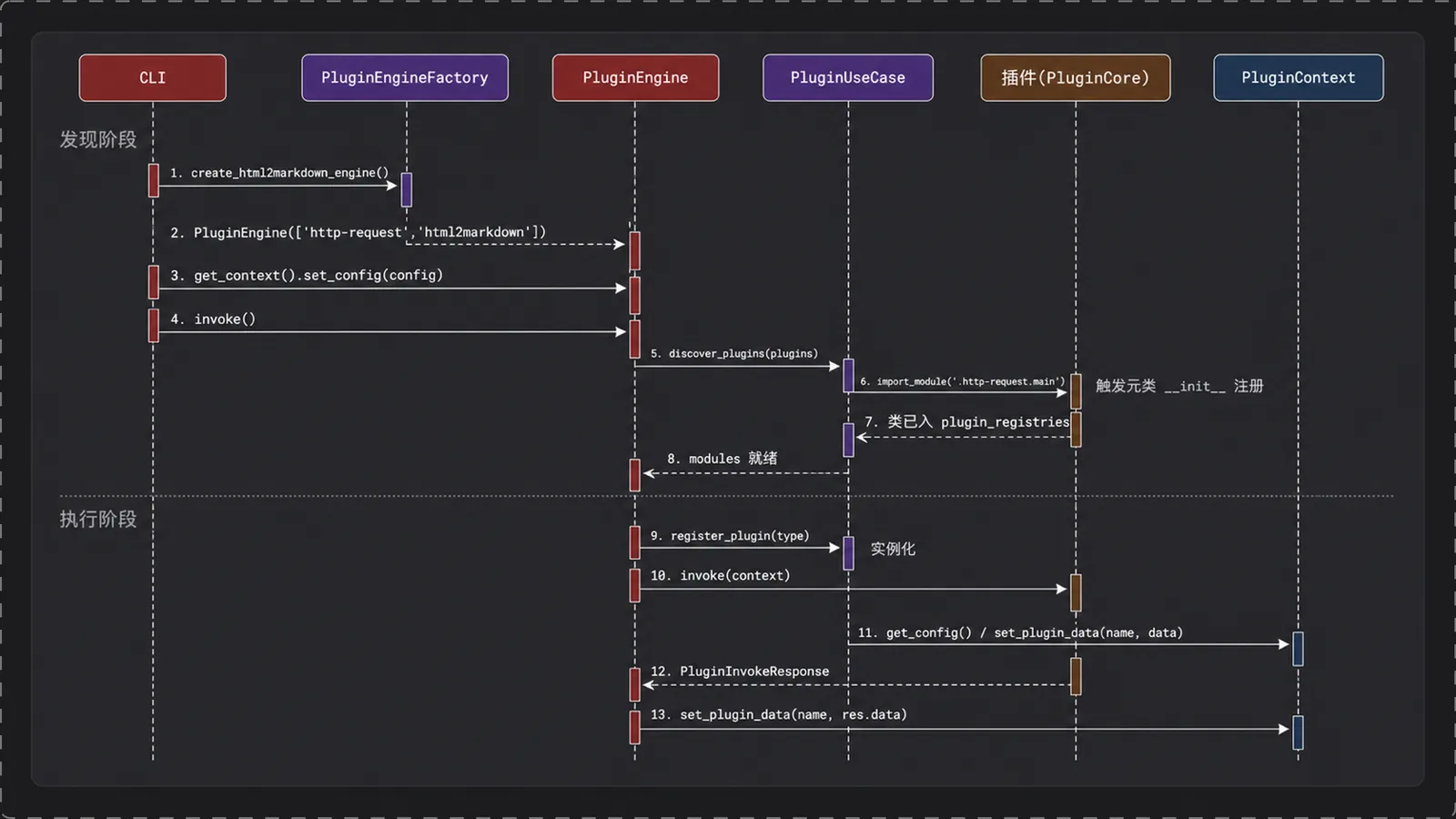
discover 阶段只做 import,不碰业务逻辑,到 invoke 阶段才开始干活。图中间那条虚线是 import 触发的元类注册,它发生在 import_module 内部,调用方看不见。下面按入口、装配、插件实现三块拆开。
3.3 入口:配置注入先于发现
bin/html2markdown/html2markdown-cli.py:
if __name__ == '__main__': # 解析命令行参数(url、--render、--no-assets 等) args = parse_args() # 读 config.yaml,得到 url / out_dir / render 等字典 config_data = FileSystem.load_configuration(args.config, current_path) # 命令行参数覆盖配置文件里的同名项 if args.url: config_data['url'] = args.url if args.no_assets: config_data['download_assets'] = False # 用工厂造出「抓网页转 markdown」专用引擎 plugin_engine = PluginEngineFactory.create_html2markdown_engine() # 配置先写进总线,再触发发现和执行 plugin_engine.get_context().set_config(config_data) plugin_engine.invoke()set_config 排在 invoke 前面,而 discover 是 invoke 内部的第一步,所以插件被 import 时配置已经在总线上。插件在 import 阶段不读配置,要等进了 invoke 才读。这样加载就不依赖配置内容,同一个模块可以加载多次,每次执行现取当时的配置。
3.4 引擎装配:工厂声明执行顺序
engine/engine_core.py:
class PluginEngineFactory: @staticmethod def create_html2markdown_engine() -> PluginEngine: # 列表即拓扑序:先抓页面,再转 markdown return PluginEngine(common_plugins=['http-request', 'html2markdown'])执行顺序由调用方在工厂里声明,跟目录排列和发现顺序都无关。common_plugins 这个列表就是管道本身,http-request 写在前面就先跑,html2markdown 写在后面就后跑,要调管道只改这一行。
3.5 插件怎么写
runtime: main: 'main.py'main.py 里定义一个 PluginCore 子类,覆写 invoke:
class HttpRequestPlugin(PluginCore): def __init__(self, logger: Logger, meta: Meta) -> None: super().__init__(logger, meta) # 插件自己的状态字段 def invoke(self, context: PluginContext) -> PluginInvokeResponse: super(HttpRequestPlugin, self).invoke(context) # 从 context 取配置、取上游产物,干活,返回 PluginInvokeResponse写一个插件要做三件事:继承 PluginCore,注册由元类自动完成;在插件目录放一个 plugin.yaml,用 runtime.main 指明入口文件;覆写 invoke,从 context 取输入,干完活把结果包进 PluginInvokeResponse 返回。
3.6 示例插件一:http-request 的 invoke
plugins/http-request/main.py 的 invoke(精简,去掉资源下载细节):
def invoke(self, context: PluginContext) -> PluginInvokeResponse: super(HttpRequestPlugin, self).invoke(context) # 从总线取入口配置 config_data = context.get_config() url = config_data.get('url') if not url: return PluginInvokeResponse.create_failed_response(-1, 'config error: url is empty') out_dir = config_data.get('out_dir') if not out_dir: return PluginInvokeResponse.create_failed_response(-1, 'config error: out_dir is empty') self._conf = config_data # 建请求会话(带 UA、cookie、header) self._session = self.__create_session() # 拼出页面输出目录和资源目录 self._page_dir = os.path.join(out_dir, config_data.get('page_dir') or self.__build_page_dir_name(url)) self._assets_dir = os.path.join(self._page_dir, 'assets') FileSystem.create_folder(self._page_dir) FileSystem.create_folder(self._assets_dir) # 抓 html,render 模式会自动判断是否需要无头浏览器 html, final_url, render_used = self.__fetch_html(url) # 原始 html 落盘 self.__write_text(os.path.join(self._page_dir, 'raw.html'), html) # 解析 DOM,扫描并下载资源,再改写引用 soup = BeautifulSoup(html, 'lxml') base_url = self.__resolve_base_url(soup, final_url) if config_data.get('download_assets', True): self.__download_assets(soup, base_url) if config_data.get('rewrite_links', True): self.__rewrite_html(soup, base_url) # 改写后的 html 落盘 html_path = os.path.join(self._page_dir, 'index.html') self.__write_text(html_path, str(soup)) # 把下游需要的字段打包成 result result = { 'url': url, 'final_url': final_url, 'title': soup.title.get_text(strip=True) if soup.title else '', 'html_path': html_path, 'url_to_local': dict(self._url_to_local), } # 返回成功响应,result 会被引擎写进总线 return PluginInvokeResponse.create_succeed_response(result)对框架而言插件就是一个函数:输入 context,输出 PluginInvokeResponse,中间的抓取和落盘全是插件自己的事。
3.7 示例插件二:html2markdown
plugins/html2markdown/main.py 里 html 转 markdown 的实现:
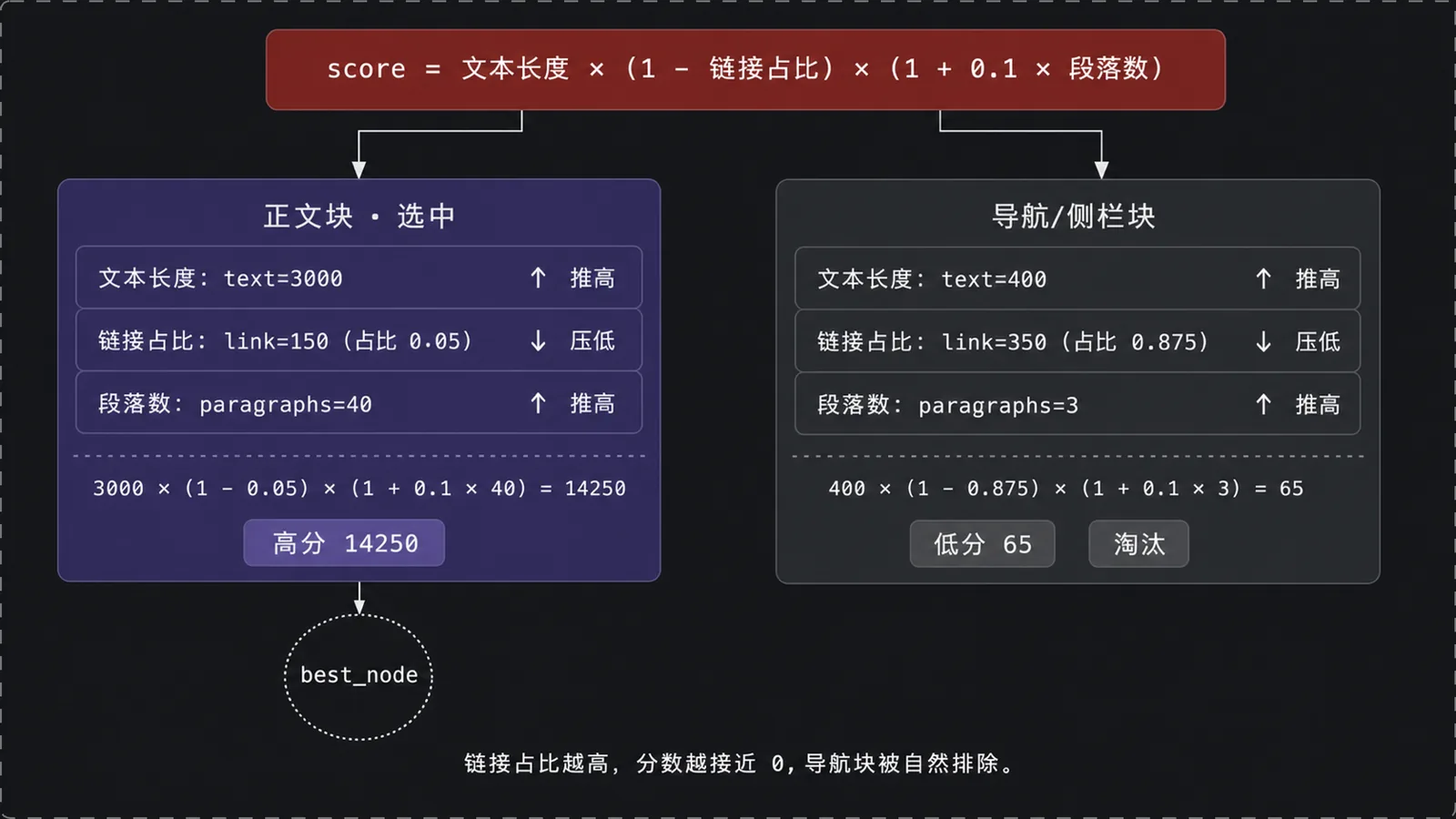
def invoke(self, context: PluginContext) -> PluginInvokeResponse: super(Html2MarkdownPlugin, self).invoke(context) self._conf = context.get_config() # 从总线取上游插件产物,拿不到就是空 dict upstream = context.get_plugin_data('HttpRequestPlugin') or {} # 优先用配置里的 html_path,否则用上游的 html_path = self._conf.get('html_path') or upstream.get('html_path') if not html_path: return PluginInvokeResponse.create_failed_response( -1, 'config error: html_path is empty and no HttpRequestPlugin data found') # 读本地 html with open(html_path, 'r', encoding='utf-8', errors='ignore') as file: html = file.read() soup = BeautifulSoup(html, 'lxml') title = self._conf.get('title') or self.__extract_title(soup, upstream) # 定位正文容器,是核心算法,见下 content, matched_selector = self.__pick_content(soup) if content is None: return PluginInvokeResponse.create_failed_response(-1, 'can not locate article content in html') # 剔除噪音、转 markdown、拼 front matter self.__clean(content) body = self.__to_markdown(content) body = self.__polish(body, title) markdown = self.__build_front_matter(title, source_url) + body # 写 markdown 文件 markdown_path = self.__resolve_output_path(html_path, title) FileSystem.create_folder(os.path.dirname(markdown_path)) with open(markdown_path, 'w', encoding='utf-8') as file: file.write(markdown) result = { 'title': title, 'markdown_path': markdown_path, 'content_selector': matched_selector, 'char_count': len(markdown), } return PluginInvokeResponse.create_succeed_response(result)本文由 AgentPlanFlow 生成